
Alternate & Mix
Mixes pages from 2 or more documents, alternating between them.
or drop files here
No files selected
Step by step
How To Alternate & Mix PDF Pages
Two or more documents, read in turn — set how each file behaves, press Mix, and the pages interleave themselves.
-
1
Upload your PDFs
Add two or more documents — pages will alternate between them. Sort A–Z or Z–A if the order matters; every file is deleted after 2 hours.
-
2
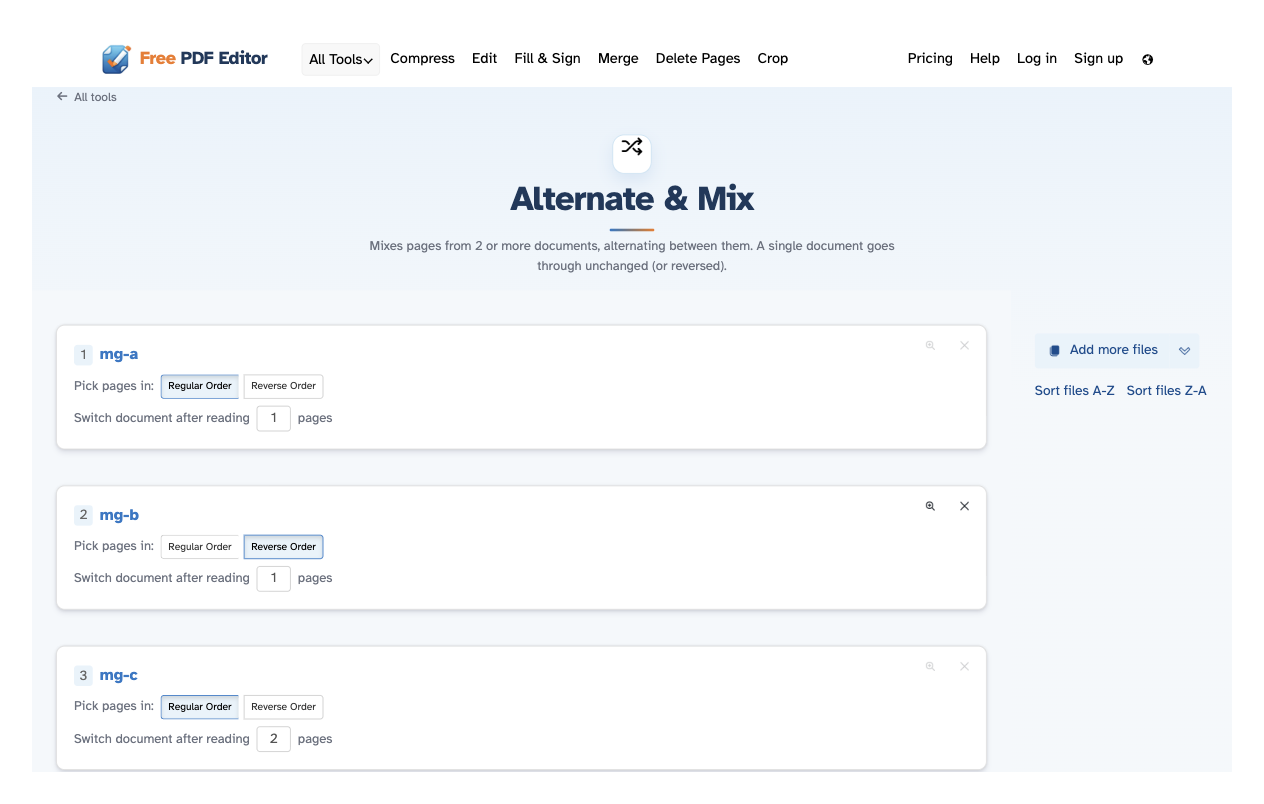
Set how each file reads
For every row: keep Regular Order or switch to Reverse Order, and set how many pages the document reads before the mix moves on — “Switch document after reading 2 pages”. Each row also carries preview and remove.
-
3
Mix and download
Press Mix PDF files and the alternating document opens ready to download, share or print.
-
Alternates between documents
Reads from each file in turn — ideal for interleaving scans, statements or two-language versions.
-
Any cycle length
Switch after N pages: take one page apiece, or read a run from each document before moving on.
-
Reverse any document
Flip a file's page order before it joins the mix — the others stay as they are.
-
Sort in one click
Order the list A–Z or Z–A without dragging anything around.
-
Add files as you go
More files can join at any time — from this computer, the clouds or a web address.
-
Private by default
No account, no watermark — and every file is automatically deleted after 2 hours.
Click pages to select. Shift, Cmd/Command to select multiple.