
Split every N pages
Split the document into chunks of N pages each, the last one holding whatever is left.
or drop a PDF here
No file selected
Files stay private. Automatically deleted after 2 hours.
Step by step
How To Split a PDF Every N Pages
Cut one document into equal chunks — say how many pages each file should hold, and the parts write themselves.
-
1
Upload your PDF
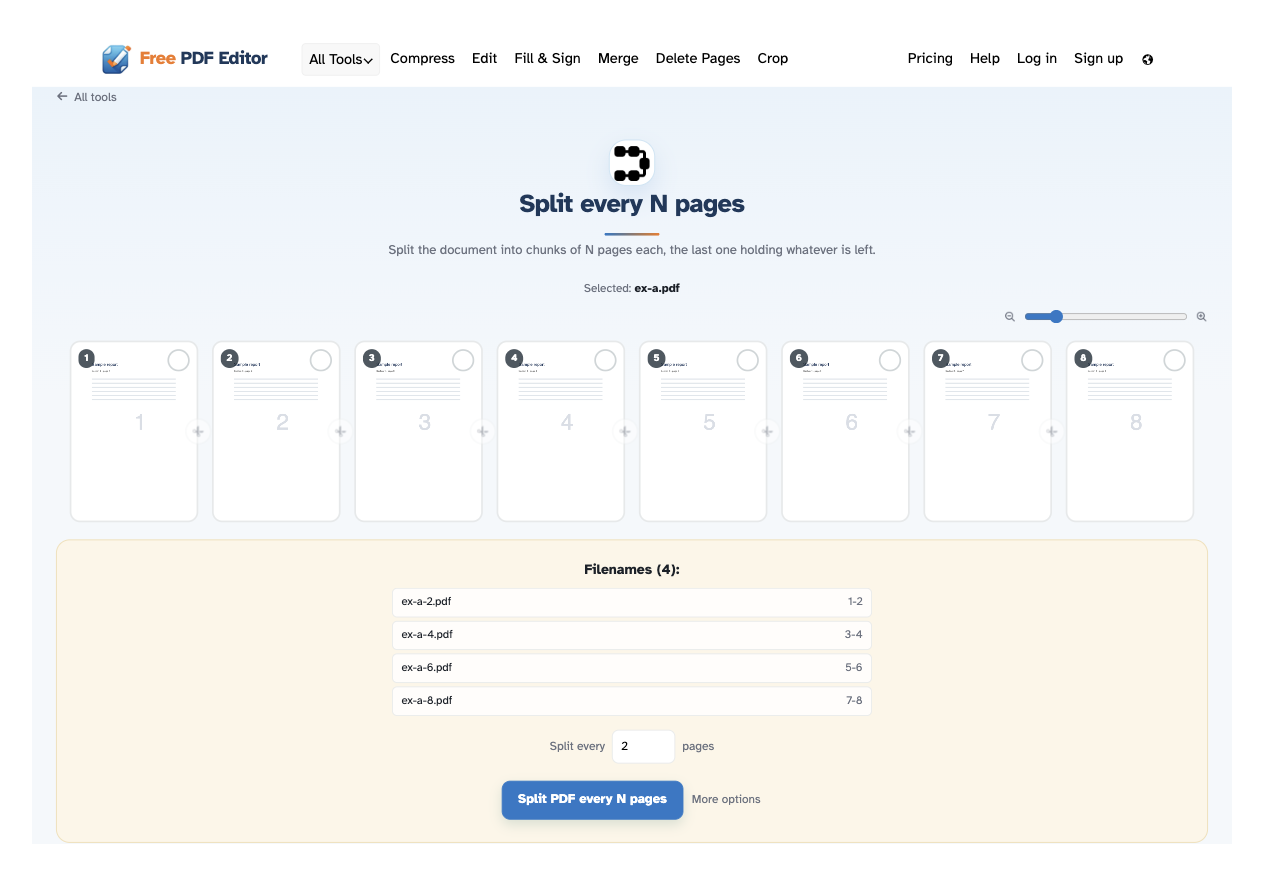
Drop in a document and every page appears as a thumbnail, with a zoom slider to size them. Files are deleted after 2 hours.
-
2
Set how many pages per file
The “Split every [2] pages” box sits right under the pages — type any number and the Filenames panel updates live: 8 pages every 2 gives four files, 1-2, 3-4, 5-6 and 7-8. The last file holds whatever is left.

-
3
Split and download
Press Split PDF every N pages and the ready page lists every part — download them one by one, or all together as a ZIP.
-
Chunks of N pages
Every N pages becomes its own PDF — 2, 3, 10, whatever you type in the box.
-
Any count you like
Change the number and the filenames and page ranges follow instantly — nothing to re-run.
-
The last part holds the rest
8 pages every 3 gives 3, 3 and 2 — no page is ever lost on the way out.
-
Filenames panel
Every part is listed under the pages as it will download — names and ranges, updated live.
-
Zoom the thumbnails
The slider sizes every preview from 100% to 400% before you split.
-
Private by default
No account, no watermark — and every file is automatically deleted after 2 hours.
Selected:
Choose an option
Filenames (0):