
Workflows with PDF documents BETA
Execute series of tasks on PDF documents. Configure tool chains to process PDFs
Chain several tools and run them on any document in one pass.
Workflows
No saved workflows yet — press Create New, or import one.
Files stay private. Automatically deleted after 2 hours.
Free service for documents up to 200 pages or 50 MB and 3 tasks per hour.
How to create workflows
-
1
Build the chain
Name the workflow, then write one step per line — for example
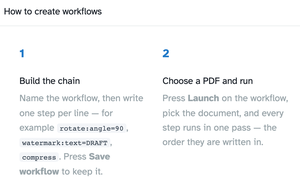
rotate:angle=90,watermark:text=DRAFT,compress. Press Save workflow to keep it. -
2
Choose a PDF and run
Press Launch on the workflow, pick the document, and every step runs in one pass — the order they are written in.
-
3
Reuse it
Launch the same chain on other documents, edit the steps at any time, or use Export and Import to move your workflows to another browser.
Step by step
How To Create Workflows
Chain several tools into one pass — rotate, watermark, compress — and run them on any document with one Launch.
-
1
Open the manager
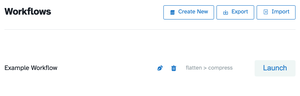
Every saved chain lists here with its tools and a Launch button — “flatten > compress” ships as an example. Create New starts a fresh one; Export and Import move your workflows between browsers. Files are deleted after 2 hours.
-
2
Build the chain
Name the workflow, then write one step per line — rotate:angle=90, watermark:text=DRAFT, compress. The page's own how-to card spells the syntax out; Save workflow keeps the chain in the list above.
-
3
Launch & download
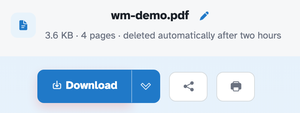
Hit Launch, pick the document, and every step runs in the order written. Our test chain (rotate:angle=90 + compress) returned the four-page document rotated 90° and recompressed — ready behind Download like any single-tool run.
-
Chains of tools
Rotate, crop, resize, n-up, flip, watermark, compress — lined up in one pass.
-
One step per line
Plain text: rotate:angle=90, watermark:text=DRAFT,size=36, compress.
-
Saved & reused
Save workflow keeps it; Launch runs it on the next document.
-
Export & Import
Move your workflows to another browser as a file.
-
One pass
Every step runs in the order they are written, inside a single task.
-
Private by default
No account, no watermark — and every file is automatically deleted after 2 hours.