
PDF to Excel
Convert PDF to Excel or CSV online for free. Extract table data from PDF
or drop a PDF here
No file selected
Files stay private. Automatically deleted after 2 hours.
Step by step
How To Convert PDF to Excel
Pull the numbers out of a PDF — with the original layout, or focused purely on tables.
-
1
Upload your PDF
Drop in the document. Scanned uploads are flagged right away — there is no text layer to pull into cells.
-
2
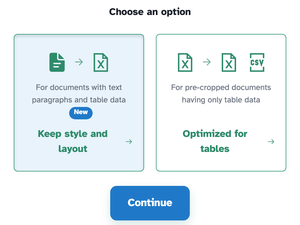
Choose the mode
Keep style and layout is for documents with text paragraphs and table data — the default. Optimized for tables is for pre-cropped documents holding only table data; it opens a second step where tables can be forced into a single spreadsheet and the output can be Excel or plain CSV.

-
3
Download the spreadsheet
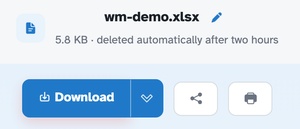
The ready page hands back a real workbook — 5.8 KB for our test — with the document's text sitting in cells you can sort, calculate and format.
-
Layout, kept
For documents with text paragraphs and table data — positions preserved.
-
Optimized for tables
For pre-cropped sheets of pure table data.
-
Excel or CSV
Tables mode offers both — a workbook or a plain CSV file.
-
One sheet or many
Tables go to separate sheets by default; force them into one with a tick.
-
Cells, not pictures
Text lands in real cells you can sort, calculate and format.
-
Private by default
No account, no watermark — and every file is automatically deleted after 2 hours.
Selected:
Choose an option
Converting scanned documents is not supported. Scanned PDFs are images of text and lack the actual text data needed for conversion.
File: